


My Recipe Box: My Cookbook
4.63.68K Reviews
App Specs
- Version
- 8.9.5
- Updated On
- License
- Free
- Downloads
- 1,000,000+
- Developer
- CmonApp
- Categories
- Food & Drink
- Platform
- Android, iOS
Screenshots
 Analysis by AppCompare
I like the idea of one dependable place for recipes more than another stream of food inspiration. My Recipe Box: My Cookbook is built around keeping a personal collection in order, which makes it most useful when you already have recipes you want to return to: family favorites, clipped ideas, and dishes you have adjusted over time. It is a free food-and-drink app from CmonApp, and its appeal is practical rather than flashy. The main question is whether you want a dedicated cookbook on your phone or are happy leaving recipes scattered across notes, browser bookmarks, and messages.
What to expect when opening it
For a recipe organizer, speed matters less as a headline feature than as a daily convenience. I would judge it by how quickly I can get from a remembered dish to its ingredients and directions, and by whether adding a recipe feels easier than saving it somewhere else. The app’s search and organization tools are aimed at that routine. If your collection is small, almost any method may feel quick; the payoff grows when you have enough recipes that scrolling through old links becomes a chore.
There is a useful distinction between finding a recipe and discovering one. My Recipe Box is better suited to the first: locating something you have already saved by ingredient, meal type, or cuisine. It is not the same experience as browsing a social feed full of new dishes. That is a strength if you want less noise while cooking, but a limitation if inspiration and a steady stream of unfamiliar recipes are what you enjoy most.
When the collection gets busy
The app becomes more valuable when a recipe has a place in your real routine. I would use tags for dietary needs or personal groupings, then make the names specific enough to be useful later: a label like “quick weeknight” can be more helpful than a broad category when I am hungry and short on time. Search works best when the collection is maintained as it grows. A few thoughtful tags at the moment of saving can save repeated hunting later.
There is also a small trade-off in building a digital cookbook: the initial sorting takes effort. A photo or manual entry can bring a recipe into the collection, but neither removes the need to check that the important details are readable and organized in a way that suits you. I would start with the recipes I actually cook, rather than trying to digitize every saved idea in one sitting. That keeps setup from turning into a project of its own.
Reliability is about trust in your own archive
A recipe keeper earns its place when I am comfortable relying on it at the moment I need it. Before moving a treasured family recipe into any single app, I would keep a second copy of the original until I am sure the digital version is complete and easy to retrieve. That is sensible housekeeping for any personal archive, especially when a recipe includes handwritten notes or a detail that matters more than the basic ingredient list.
The same care applies to recipes shared with other people. A collaborative edit can be handy, but I would preserve the version I know works before trying someone else’s adjustment. That way, experimenting does not erase the original proportions or method. The app’s sharing and collaboration tools make recipes more social, though a group may still need to agree on who is editing the master version and how changes are named.
Worth Reading Before You Choose

Flipboard Shows What News Apps Must Do Beyond the Feed

Switching to Android Auto Means Rethinking Your Driving Routine

Google Calendar Makes a Crowded Week Easier to Manage

Ludo King Makes the Most of the Minutes Between Plans

Baby Panda World Brings Quick Play to Modern Phones, but Its Game Library Feels Busy

ESPN’s Live Game View Makes Following Close Games Easier
Device fit and practical limits
My Recipe Box is rated for Everyone and supports devices running Android 7.0 or later. It has been available since April 20, 2013, and its current version is 8.7.6. Those details make it relevant to a broad range of Android users, though an older phone can still feel different from a newer one in everyday use. I would keep the app updated where possible and test a couple of saved recipes before depending on it for a large collection.
The app has a 4.6 average from around 45,000 ratings, with roughly 3,600 written reviews and over one million installs. It is free to download, with in-app purchases ranging from $0.99 to $29.99 per item. That makes it easy to try the basic approach before deciding how much you want to invest. I would check the purchase options in the app itself and treat any paid choice as optional until I know it solves a real need.
Organizing Your Culinary World
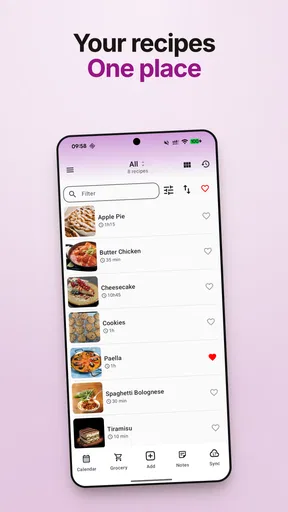
First off, let's talk organization. My Recipe Box does a stellar job at letting you keep all your recipes in one neat digital space. Forget about flipping through stained pages or scrolling endlessly through bookmarks. With this app, you can easily store your beloved recipes and access them with a simple tap. It’s like having your personal cookbook that you can take anywhere!
Adding new recipes is a breeze. You can manually enter them, or if you're feeling a bit lazier (like me on a Sunday afternoon), you just snap a photo of a recipe, and voilà! The app converts it into a digital format. It's like magic, minus the wand.
Customizing to Your Taste
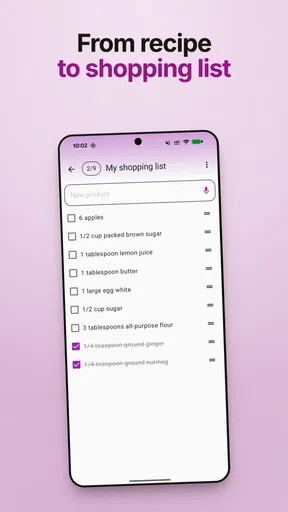
One feature I absolutely love is the customization options. Whether you’re gluten-free, vegan, or just plain ol' picky, the app lets you tag and categorize recipes based on your dietary needs. It’s perfect if you’re trying to keep track of what’s healthy, what’s indulgent, and everything in between. Plus, you can create shopping lists directly from your recipes, which is super handy when planning your weekly grocery haul.
And let's not forget the search function. You can find any recipe by ingredient, meal type, or cuisine. So, if you’re in the mood for a spicy Thai curry or a comforting Italian pasta, you’re just a search away from dinner perfection.
Sharing the Love
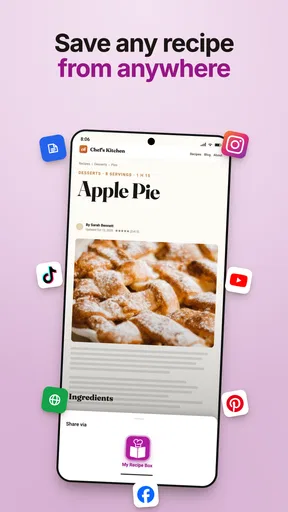
What’s a great recipe if you can’t share it with friends and family? My Recipe Box makes sharing as easy as pie. You can send recipes via email or social media, making it a cinch to spread your culinary creations. Plus, if you’re part of a cooking group or just have a bunch of foodie friends, this feature is a real gem.
I also appreciate the ability to collaborate on recipes. Got a friend who’s a whiz at baking? They can add their tweaks to your shared recipe, making it a collaborative masterpiece. It’s like cooking together, even when you’re miles apart.
Cooking Made Simple
The app is incredibly user-friendly. Even if you’re not particularly tech-savvy, navigating My Recipe Box is straightforward. The interface is clean and intuitive, meaning you spend less time tapping around and more time actually cooking. And if you’re the kind who likes to cook along with a voice, the app’s voice-guided instructions keep your hands free for the fun stuff.
One nifty feature is the integrated timer. No more fumbling around with multiple devices to keep track of cooking times. Set the timer directly from the recipe, and you’re golden. It’s the little things like this that make the app feel like a real kitchen companion.
Choosing a recipe tool that fits
Compared with a notes app, the advantage here is structure: recipes can be tagged, searched, and connected to shopping lists instead of becoming an undifferentiated pile of text. Notes may still be the better option for someone who only saves a handful of dishes or wants a flexible place for meal plans, reminders, and unrelated lists. Browser bookmarks are convenient at the moment of discovery, but they can be awkward when you want to find a dish by ingredient or keep your own cooking changes close to it.
Recipe websites and social platforms serve a different purpose. They are often better when I want fresh ideas, pictures, or a wider browsing experience; a personal cookbook is better when I want to retrieve a proven recipe without revisiting a page full of unrelated content. I would not replace a source I enjoy discovering recipes from. I would use this app as the home for the recipes I have decided are worth keeping.
A kitchen workflow that stays manageable
Here is a realistic way I would use it on a busy weekday: while planning dinner, I search for a saved dish by a main ingredient, check the recipe, and build a shopping list from it before heading out. At the store, the list is more useful than trying to remember quantities from a quick glance at the recipe. Later, I can return to the same entry while cooking, rather than reopening a message or retracing a browser search. The point is not that this removes every planning step; it puts the steps I already take in one place.
A useful habit is to add a short personal note when a recipe changes in your kitchen: perhaps you prefer less heat, or the family liked a particular substitution. That makes the collection more valuable than a folder of copied originals. I would keep those notes factual and distinct from the recipe’s core method, especially if other people use the same entry. It reduces the chance that a future cook mistakes an experiment for the version that worked reliably.
For a shared household, I would also settle on a simple naming convention before adding dozens of recipes. Names such as “lentil soup” can become hard to distinguish if there are several variations; a short cue about the version or occasion can make search results more useful. This is a low-effort improvement that matters more as the cookbook grows, and it avoids creating an elaborate category system that takes longer to maintain than it saves.
Who will get the most from it
I think the strongest fit is someone who cooks from a mix of sources but wants one personal archive: a home cook collecting family recipes, a person organizing meals around dietary preferences, or a busy household that repeats dependable dinners. The tags and search can help separate “good for guests” from “easy after work,” while the shopping list gives saved recipes a practical role before cooking begins. It is especially appealing if you value returning to your own tried-and-tested choices more than browsing a new recipe feed every day.
I would skip it if you rarely cook, already have a system you genuinely use, or mainly want a service that supplies and recommends recipes for you. It may also be a poor fit if you dislike entering or organizing information: the collection becomes useful through the care you put into saving and labeling it. For someone who needs a shared, always-synchronized household planner above all else, I would compare available options carefully rather than assume a recipe-focused app covers every planning need.
How I would judge performance in practice
In everyday use, the most meaningful performance test is whether the app stays out of the way during a cooking session. Searching, opening a recipe, and setting its timer should feel like small steps, not a separate task that interrupts dinner. I cannot sensibly promise the same speed on every device or with every collection, so I would try the workflow with a few recipes first. If the app feels comfortable on your phone, then gradually moving more of your cookbook is a reasonable next step.
Resource use and recovery matter most on an older or space-constrained device, but I would not install a large archive all at once before learning how the app behaves on that phone. Start with a few recipes, close and reopen the app, and make sure you can find the entries you just saved. Keep originals of especially important recipes while you build confidence in your own process. This is not a special trick for one app; it is a sensible way to protect personal information you would hate to lose.
If a recipe photo is difficult to read, check the result before relying on it at the stove and correct anything that could change the dish. A conversion that saves typing is only useful when the ingredients and steps remain clear. For a cookbook assembled from family cards, this simple review is more important than speed: preserve the original image or paper copy until you are satisfied that the digital version carries the details you need.
Final Thoughts
If you’re serious about cooking, or even if you’re just looking to bring some order to your recipe collection, My Recipe Box: My Cookbook is an absolute winner. It brings a level of ease and efficiency that’s perfect for today’s busy lifestyle. Whether you’re whipping up a quick weekday meal or planning a dinner party, this app is your go-to solution.
So, if you're ready to take your culinary game to the next level, give My Recipe Box a try. It’s like having a sous chef who knows exactly what you need, right in your pocket.
My performance verdict
My overall view is that this is a practical organizer, not a tool that needs to do everything in the kitchen. Its strongest performance is the reduction of small bits of friction: keeping a recipe findable, turning a saved dish into a shopping list, and making a timer available while you cook. For those jobs, the focused approach is more valuable than a crowded set of unrelated features.
I would treat it as a good fit if you are willing to curate your collection and want a portable home for recipes you actually use. If you want automatic discovery, a comprehensive meal-planning system, or a place that requires no upkeep, another kind of food app may suit you better. For me, the deciding test is simple: save a few recipes you make often, then see whether reaching them next time feels easier than your current method. If it does, the app has earned its place in your kitchen.
Pros
- User-friendly interface for easy navigation.
- Customizable recipe categories for organization.
- Offline access to saved recipes.
- Ability to share recipes with friends.
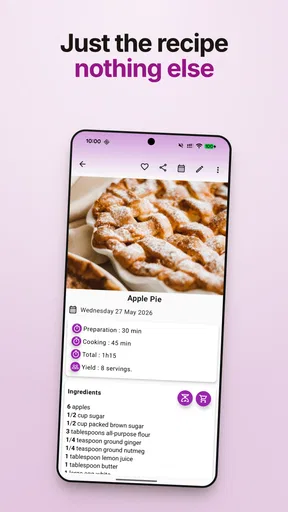
- Supports ingredient scaling for servings.
Cons
- Limited free features in the basic version.
- No nutritional information for recipes.
- Occasional syncing issues across devices.
- Ads can be intrusive in free version.
- Requires account for cloud backup.
FAQs for My Recipe Box: My Cookbook
What features does My Recipe Box: My Cookbook offer?
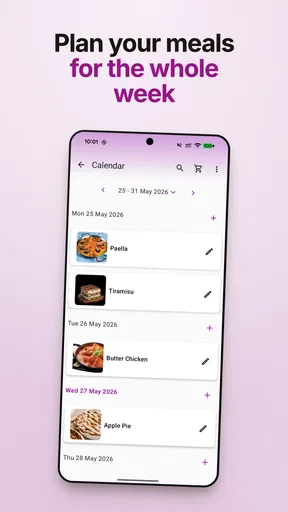
My Recipe Box: My Cookbook provides a comprehensive set of features including recipe organization, meal planning, and grocery list generation. Users can import recipes from websites, categorize them, and even add personal notes. The app also supports syncing across devices, ensuring your recipes are accessible anytime, anywhere.
Is My Recipe Box: My Cookbook available offline?
Yes, My Recipe Box offers offline access to your saved recipes. Once downloaded, you can view and edit your recipes without an internet connection, making it convenient for cooking in areas with limited connectivity. However, some features like syncing require internet access.
How user-friendly is My Recipe Box for beginners?
My Recipe Box is designed with user-friendliness in mind, featuring an intuitive interface that guides users through adding and categorizing recipes. Beginners will appreciate the step-by-step instructions for importing recipes and the easy-to-navigate layout, making the app accessible for all cooking enthusiasts.
Can I share my recipes with others using this app?
Absolutely! My Recipe Box allows you to share your favorite recipes with friends and family via email or social media. You can also collaborate by sharing your recipe box with other users, making it a great tool for sharing culinary insights and family favorites.
What are the customization options in My Recipe Box?
The app offers various customization options, allowing users to categorize recipes by cuisine, course, or dietary preference. You can also adjust the serving sizes and ingredients to fit your needs. Additionally, personalized tags and notes can be added to enhance organization and personal touch.


